Quick start
After installation of package you can use it in you code.
Firstly you need to create mesh file which represent shape of house.
It can be create in Free SketchUp
Also it can be create on any 3D editors which can formed files .obj and .stl
After that put this mesh file to .files/ folder.
For example:
file main.py:
import os

import uuid

import settings
from solarhouse.building import Building
from solarhouse.calculation import Calculation
import solarhouse.export as export


def main():
    calc = Calculation(
        tz=settings.TZ,
        geo=settings.GEO,
        building=Building(
            mesh_file=settings.PATH_FILE_OBJECT,
            geo=settings.GEO,
            wall_material=settings.WALL_MATERIAL,
            wall_thickness=settings.WALL_THICKNESS,
            start_temp_in=settings.TEMPERATURE_START,
            power_heat_inside=settings.POWER_HEAT_INSIDE,
            efficiency=settings.EFF,
            heat_accumulator={
                'volume': 0.032,
                'material': 'water',
            },
            windows={
                'area': 0.3,
                'therm_r': 5.0,
            },
            floor={
                'area': 1.0,
                'material': 'adobe',
                'thickness': 0.2,
                't_out': 4.0,
            },
        ),
                    )
    data_frame = calc.compute(date=22, month=12, year=2019, with_weather=False)
    calc_id = str(uuid.uuid4())
    output_dir = os.path.join(settings.PATH_OUTPUT, calc_id)
    os.makedirs(output_dir, exist_ok=True)
    csv_file_path = export.as_file(data_frame, 'csv', output_dir)
    export.as_html(data_frame, output_dir)

if __name__ == "__main__":
    main()
file settings.py:
import os
import pathlib


_this_dir = pathlib.Path(__file__).parent.absolute()

PATH_FILE_OBJECT = os.path.join(_this_dir, 'files/cube.obj')
TIME_TICK = 1    #1 hours
WALL_THICKNESS = 0.3
TEMPERATURE_START = 20  #celcium
POWER_HEAT_INSIDE = 0   #kWtt
MASS_INSIDE = 500   #kg
PATH_FILE_TEMPERATURE_OUTSIDE_FILE = os.path.join(_this_dir, 'files/temp_table.csv')
PATH_EXPORT_THERMO_RESULT_FILE = os.path.join(_this_dir, 'files/results.csv')
SPACE_POWER_ON_METER = 1000
WALL_MATERIAL = 'adobe'
EFF = 75        #in percents
EFF_ANG = 85.0
GEO = {
    'latitude': 54.841426,
    'longitude': 83.264479,
}
TZ = 'Asia/Novosibirsk'
COUNT_FACES_FOR_PARALLEL_CALC = 1000
PATH_OUTPUT = os.path.join(_this_dir, 'output')
All parameters of a house (mesh, thickness of wall, material of walls and etc.) sets in file settings.py
After that you can start calculation:
$python3 main.py
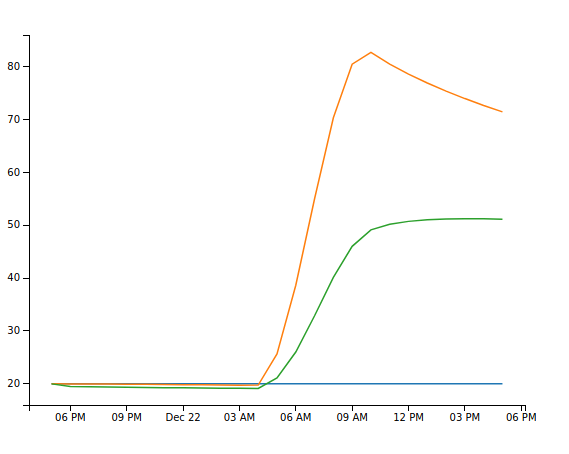
As result you get two files in folder with output/<calc_id> : data.csv and plot.html like on pictures: